LUFS: why do mono and stereo read differently?
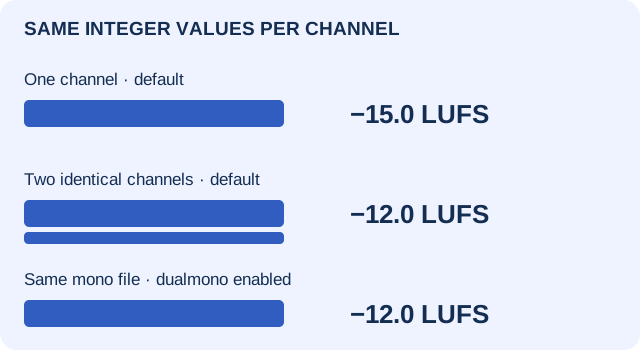
LUFS means Loudness Units relative to Full Scale: a frequency-weighted loudness measurement, not the highest stored sample. A reading also depends on the channels and meter settings. In our controlled test, duplicating the same mono samples into two channels changed integrated loudness from −15.0 to −12.0 LUFS without raising either channel's sample peak. Selecting dual-mono compensation on the original mono file also gave −12.0 LUFS, without changing that file at all.
Before changing your audio to chase a number, record what was measured: the file, channel layout, time span, loudness mode and meter configuration. True peak is a separate peak measurement; keep it beside LUFS, not inside the same unit.
Same samples per channel. Different loudness context.
Collected and repeated , on a test machine. We generated three six-second, 48,000 Hz, signed 16-bit PCM WAVs, then ran the installed FFmpeg ebur128 filter. The mono and duplicated-stereo 1 kHz files contain exactly the same integer sequence in each channel. The third file is a separate high-frequency stress illustration, not another version of that 1 kHz signal.
| Input / meter setting | Channels | Sample peak, dBFS | Integrated, LUFS | FFmpeg true-peak estimate* |
|---|---|---|---|---|
| 1 kHz mono / dualmono=false | 1 | −12.041200 | −15.0 | −12.0 |
| Same integers in L and R / dualmono=false | 2 | −12.041200 | −12.0 | −12.0 |
| Original mono / dualmono=true; panlaw=−3.0103 | 1 | −12.041200 | −12.0 | −12.0 |
| 12 kHz mono / dualmono=false | 1 | −4.948678 | −1.6 | −1.3 |
Scroll sideways for all columns; with a keyboard, focus the table and use the arrow keys. *The installed filter literally labels its true-peak summary “dBFS”; values here retain that label and are not a certified meter comparison.
The first and third rows use the identical mono-1khz.wav, SHA-256 ff804dd0da6d87de31febc64eac93a36a12ccf18d004bbec7641c7ad7f463888. Its peak remains 8,192 integer counts. The changed reading is not evidence that the waveform was amplified, repaired or normalized. The stereo file is a different WAV with two copies of the sequence, not a louder integer in either copy.
The official filter reference explains that dual-mono compensation is intended for a mono signal expected to play through a stereo system. The option defaults to false; its pan-law default is approximately −3.01 dB. Use the setting that describes your intended measurement context, and document it. Do not enable it simply to obtain a preferred number, apply it again to an already stereo file, or assume every meter makes the same default choice.
This is not our stereo-cancellation test. That page averages opposite-polarity channels before pitch detection. Here, matched-channel loudness accounting is the question; no channels were polarity-inverted, no pitch detector ran and no MIDI was produced.
Which LUFS reading are you comparing?
- Momentary LUFS
- A 400 ms measurement window. A moving reading, not a whole-track summary.
- Short-term LUFS
- A three-second window. Useful for comparing corresponding sections, but not interchangeable with integrated.
- Integrated LUFS
- Loudness measured across the selected program with gating. State the complete selection and reset accumulated history before a comparison.
- LU versus LUFS
- LU describes a loudness difference; LUFS gives a level relative to full scale. The first two displayed integrated results differ by 3.0 LU at the meter's displayed precision.
The EBU metering specification defines the loudness modes. A reading from one chorus cannot be substituted for a full-song integrated measurement, even when both displays say “LUFS.” Our table uses each entire six-second fixture and a fresh filter process for every row. We did not test gating on long silences, musical arrangements or accumulated playback history.
True peak is not a LUFS target
A sample-peak measurement finds the largest stored sample magnitude on a defined scale. True-peak metering estimates the peak of the reconstructed signal, commonly reported in dBTP. It can differ from the stored sample peak because the signal between samples is not limited to the heights of the sample dots. LUFS, meanwhile, accounts for weighted energy over time. None of these is a substitute for the other two.
Our third fixture deliberately places a 12 kHz sine at one quarter of its 48 kHz sample rate, with phase π/4 and generator amplitude 0.8. Its stored sample peak is 18,536 counts: 20 × log10(18536 / 32768) = −4.948678283556 dBFS. The installed oversampling filter reported a true-peak estimate of −1.3 under its literal dBFS label, and integrated loudness of −1.6 LUFS. That is a measured counterexample to treating these three numbers as interchangeable.
The −1.3 result belongs to this finite six-second file and this filter build. There are abrupt start/end boundaries and no fades; interpolation and boundary behavior contribute to the reported maximum. It is not an ideal infinite-sine calculation, a universal sample-to-true-peak correction, a physical DAC measurement, a codec test or proof of audible distortion. The file stays below both signed 16-bit integer rails. A peak estimate alone does not identify the recording's history; the separate peak-evidence guide handles that question.
Before fixing “wrong LUFS,” match these five things
- File and stage. Keep an untouched copy. Are both meters reading the same decoded file, before or after the same processing? Record a hash where possible. A transport fader or export change is not a meter-only comparison.
- Channels. Write the actual count/layout and any downmix, mono compensation or pan-law setting. “The same melody” is not proof of identical channel data.
- Time and mode. Reset the meter, measure the same start/end and compare integrated with integrated. Do not substitute a momentary maximum for a program summary.
- Peak definition. Keep sample peak and true-peak estimate in separate fields, with the implementation's units, oversampling configuration and displayed precision.
- Decision. If the contexts disagree, align them before editing audio. If they agree but the results still differ, retain versions/settings and investigate the implementations. This worksheet does not certify either meter or choose a master for you.
The downloadable 13-column meter-context worksheet separates the four measured rows, recommendation rows and a blank observation row. It makes a missing setting visible instead of filling it with an assumed default.
What LUFS should my audio be?
Use the current delivery specification for the actual destination and content, not one number for every use. EBU R128 is a broadcast loudness recommendation; it is not a universal mastering instruction or this site's input requirement. A playback-normalization reference and a creative mastering decision are different things. No streaming platform, listener preference or “best” music level was tested here.
For audio-to-MIDI, these measurements document the source; they do not establish a required LUFS value or better note accuracy. Our quiet-note sensitivity test answers a separate detector-threshold question. Do not normalize a recording merely because its LUFS differs from a synthetic fixture.
Download the exact inputs and meter outputs
- 1 kHz mono WAV · 576,044 bytes
- Duplicated stereo WAV · 1,152,044 bytes
- 12 kHz stress WAV · 576,044 bytes
- Raw meter outputs: mono default · stereo default · same mono with compensation · quarter-rate stress
- Generator settings, exact readings and complete hashes · Installed filter help
- Standalone Node reproduction script · Measurement worksheet
With Node and an installed FFmpeg, set FFMPEG_BIN to that executable if it is not on your PATH. In a fresh directory run node reproduce.mjs --out ./repeat, then node reproduce.mjs --out ./repeat --check. It refuses to replace an existing observation record. All three file hashes and all four rounded summaries matched on our same-day rerun. A different build can produce different interpolation or rounding results; keep its version rather than silently substituting it.
ffmpeg -hide_banner -nostdin -i mono-1khz.wav -af ebur128=peak=true:dualmono=false -f null -
ffmpeg -hide_banner -nostdin -i mono-1khz.wav -af ebur128=peak=true:dualmono=true:panlaw=-3.0103 -f null -
The installed build was N-92722-gf22fcd4483, an older FFmpeg build, not claimed to be current. Each fixture has 288,000 frames; duration is frames divided by 48,000. The generator is round(32767 × amplitude × sin(2π × frequency × i / 48000 + phase)). The script measures stored samples separately from the filter summaries and uses only local filenames in its commands.
No microphone, analog playback, browser decoder, file-picker conversion, listening judgment, real song, normalization treatment, MIDI accuracy, commercial meter comparison or compliance certification was tested. The contribution is this dated paired-file/configuration comparison and reproducible context record, not the invention of LUFS, channel weighting or true-peak theory. The general clipping explanation answers a different question: what peak shaping means and which investigation to choose.