Audio clipping:
What does it mean?
Audio clipping is a form of distortion in which a signal's peaks are constrained by a level limit, changing the waveform. It is not the same as cutting a shorter excerpt. First decide whether you need to investigate a saved recording, choose a time boundary, or control a new recording. Those are different jobs; the guide map below sends you to the relevant evidence instead of treating every use of “clip” as one problem.
One family. Three different jobs.
Choose by what you are trying to establish, not by a similar-looking filename. This is a navigation map, not a diagnosis or three new tests.
01 / THE SAVED SOUND
“Can I still use this take?”
Start with the clipped-audio repair-versus-rerecord guide. Its distinctive comparison separates the recorded waveform from the MIDI notes obtained from it. It addresses audio acceptance, not where to cut a phrase.
02 / THE TIME SELECTION
“Did my cut keep the phrase?”
Use the MP3 excerpt-boundary guide. Its evidence concerns what the beginning of a crop removes. Here “clipping an MP3” means making an excerpt, not flattening peaks; it does not evaluate repair of overloaded sound.
03 / THE NEXT RECORDING
“Which control reaches the take?”
Use the recording-versus-monitor control guide. Its paired software outputs isolate the destination a control changes. That is a routing model, not a physical microphone test or a way to reconstruct an existing recording.
Only have a peak number? The separate peak-evidence investigation handles that narrower question. Keep the number, the stage it describes and the suspected problem separate. This hub does not reproduce its equal-peak dataset or prescribe a universal “safe” peak.
Amplitude and time are different axes
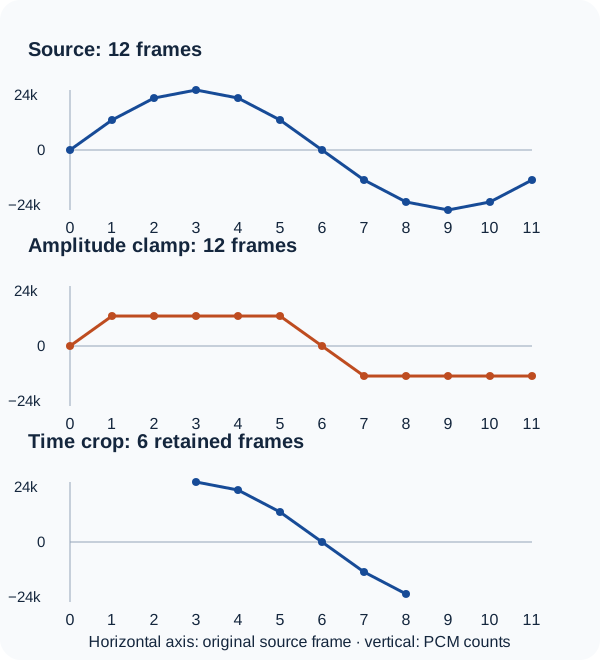
We made a deliberately tiny coordinate example on the test machine on . A twelve-sample sequence became three actual mono, signed 16-bit WAV files: the unchanged source, a copy with values clamped to −12,000/+12,000 counts, and a copy retaining source frames 3 through 8. We read the files back to verify their samples and headers.
This is an arithmetic illustration, not a usable musical excerpt or listening test. At 12,000 frames per second, twelve frames last just 0.001 seconds. The clamp is an intentionally chosen software threshold, not the 16-bit storage rail, a 0 dBFS reading or a recommended recording setting.
| Operation | Output frames | File duration | Retained values changed | Source frames removed |
|---|---|---|---|---|
| Unchanged source | 12 | 0.001 s | 0 | 0 |
| Clamp amplitude | 12 | 0.001 s | 6 | 0 |
| Crop time | 6 | 0.0005 s | 0 | 6 |
Scroll the table sideways; with a keyboard, focus it and use the arrow keys.
Watch the same arithmetic example
40-second silent illustration of the twelve-frame example above. Measurements are from October 13, 2026; this is not an audio repair, listening test or recorded editor demonstration. Watch the video on YouTube.
The source's fourth value is +24,000 counts. The amplitude-clamped copy retains that position but stores +12,000. The time crop instead makes the unchanged +24,000 value its first output frame. One operation changes the value at a retained position; the other changes which positions remain. In this pure PCM slice, keeping fewer frames is not an amplitude repair.
That distinction is the reason for the three-guide map. If a request says “clip the audio,” ask what must change: peak shape, the selected time span, or the control feeding a future take. If two jobs are needed, name them separately. For example, shortening a damaged recording creates an excerpt of that recording; the shorter length alone says nothing about restored peaks.
Audacity's Distortion documentation distinguishes hard and soft peak shaping. Its Audio Clips documentation describes time trimming, including nondestructive hidden material. Our example writes a new six-frame file, not an Audacity project with hidden audio.
Where audio distortion fits
Clipping is one kind of audio distortion, not a synonym for every unwanted sound. Hard clipping sharply constrains peaks; soft clipping rounds the transition more gradually. Deliberate shaping in an effect and accidental overload are different contexts, even though both can change a waveform. This page does not rank the sound of either.
Crackle, a clicking edit, background noise or an unusual waveform is a reason to investigate, not enough information to name the cause. Audacity's recording troubleshooting reference treats loud-recording clipping, dropouts and displaced waveforms as separate issues. If the concern is displaced average level, use the existing regional DC-offset guide; do not turn every asymmetry into a clipping diagnosis.
Before choosing a specialist page, write one sentence with three parts: the object, the observation and the desired result. “My exported vocal sounds rough; I need usable recorded sound” points to the saved-take investigation. “My excerpt begins after the phrase starts; I need the whole phrase” points to the crop investigation. “My headphones got quieter; I need to establish what is recorded” points to the control investigation. These are illustrative routing questions, not observations collected from your device.
Keep the map and check the example
The question-and-operation worksheet (CSV) has 13 columns. Four recommendation rows, three measured illustration rows and one blank observation row are labeled separately. Leave unknowns blank: selecting a guide does not confirm a fault.
- Exact twelve-frame source WAV
- Amplitude-clamped WAV · Time-cropped WAV
- Every stored value, source index, measurement and WAV hash
- Standalone Node reproduction script
In a fresh folder with Node installed, run node reproduce.mjs --out ./repeat, then node reproduce.mjs --out ./repeat --check. The script generates the files and checks their complete hashes, WAV headers and integer samples. It refuses to overwrite an existing observation record. SHA-256 establishes byte identity, not listening quality.
The source formula is round(24000 × sin(2πi/12)) for integer indices 0–11. Cropping uses start 3 inclusive and end 9 exclusive. File duration is stored frames divided by 12,000; the source and clamped files are 68 bytes each, the crop 56 bytes. The stored sample peak is 24,000, 12,000 and 24,000 counts respectively. These are construction-specific values, not diagnostic limits for an unknown file.
No microphone, analog stage, browser decoder, file-picker conversion, listening, real performance, MP3 cutter, repair effect, true-peak calculation or MIDI output was tested for this illustration. It neither measures how clipping affects a song nor duplicates the specialists' experiments. This page's job is the general explanation and question map; use the linked guide for the particular decision and its stated limits.