Remove background noise from audio:
Is quieter actually cleaner?
To remove background noise from audio, work on a copy, identify the unwanted sound, apply a suitable reduction, then compare both the noise and the sound you wanted to keep. Turning the whole file down reduces both; a gate can quiet gaps while leaving noise under a note. Filtering can reduce hum but also remove a wanted low tone. A quieter result is not, by itself, a cleaner one.
Start with what must survive
- Keep the original audio. Save a separate working copy. Mark a representative passage containing the intended voice or instrument and, if available, a nearby noise-only gap.
- Name the unwanted sound. Steady hum or hiss, an isolated click, another musical part and room reverberation are different problems. Do not treat everything other than a voice as disposable if you need an instrument or music bed.
- Choose a matching process. For steady noise, an editor with noise-profile reduction can learn a noise-only selection. For a localized nuisance, investigate a focused filter or repair. For gaps only, a gate/expander may be sufficient; it does not isolate a voice from simultaneous noise.
- Preview a modest change and the removed material. Check for lost low notes, weak attacks, softened consonants or an altered tail. If the wanted sound is being removed, back off or change the approach. Do not chase the quietest possible waveform.
- Export a new audio file and reopen it. Compare the same passage at sensible, comparable listening levels. Inspect the gaps and the active passage separately. If the result cannot meet the intended use, seek a cleaner source or rerecord when possible.
For a documented noise-profile workflow, the Audacity Noise Reduction manual describes learning from noise alone, processing the desired selection, and using Preview/Residue to check unwanted removal. It also warns about variable noise and overlap with wanted sound. That is documentation, not an Audacity test performed here. Our measured comparison below uses FFmpeg instead.
This site makes MIDI drafts from existing audio; it does not offer a noise-removal upload service. The steps above concern an audio editor and a saved audio copy, not a new feature in our converter.
Measure the gap and the note separately
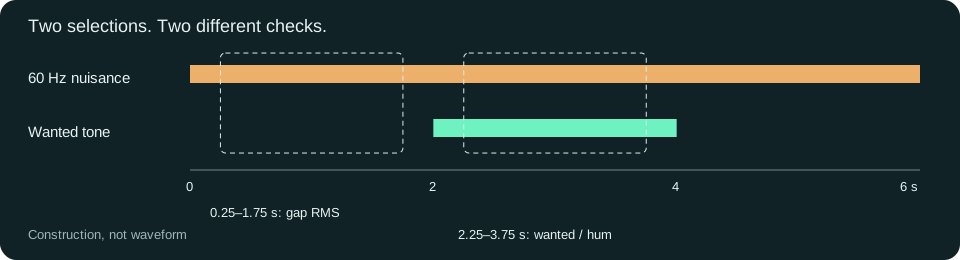
Collected and repeated October 15, 2026, on the test machine. We generated two six-second mono WAVs with the same continuous 60 Hz nuisance tone. One has a wanted 1,000 Hz tone from seconds 2 to 4; the other has a wanted 90 Hz tone over that same interval. Each input went through three actual processing paths, producing six output WAVs. These are controlled synthetic tones, not speech, a song or a listening-quality comparison.
| Wanted tone / path | Wanted amplitude counts | 60 Hz amplitude counts | Wanted / hum dB | Noise-only RMS counts |
|---|---|---|---|---|
| 1,000 Hz / input | 9,000.005 | 3,000.005 | 9.542 | 2,121.298 |
| 1,000 Hz / quarter gain | 2,249.980 | 749.989 | 9.542 | 530.353 |
| 1,000 Hz / gate-expander | 9,000.005 | 3,000.005 | 9.542 | 0 |
| 1,000 Hz / high-pass 200 Hz | 8,992.122 | 268.857 | 30.487 | 189.681 |
| 90 Hz / input | 9,000.001 | 3,000.004 | 9.542 | 2,121.298 |
| 90 Hz / quarter gain | 2,249.987 | 750.015 | 9.542 | 530.353 |
| 90 Hz / gate-expander | 9,000.001 | 3,000.004 | 9.542 | 0 |
| 90 Hz / high-pass 200 Hz | 1,785.357 | 268.826 | 16.445 | 189.681 |
Scroll sideways for all columns. With a keyboard, focus the table and use the arrow keys. Values are rounded here; the CSV and JSON retain full precision.
“Wanted / hum” is a two-tone amplitude ratio, not broadband SNR or a quality score. We fitted the two known frequencies in the active 2.25–3.75-second selection. The last column instead measures the noise-only 0.25–1.75-second selection. Do not mix those regions or call an empty gap evidence of clean musical content.
01 / Lower level
Quarter gain reduced both fitted components to about a quarter of their input amplitudes. Their ratio stayed about 9.542 dB. The quieter file did not selectively reject this hum.
02 / Quieter gaps
The gate/expander path yielded zero stored-sample RMS in the chosen noise-only region, after 16-bit quantization. During the wanted tone, its ratio stayed 9.542 dB. This is not a claim of zero noise throughout the file or a universal gate result.
03 / Filter trade-off
The same 200 Hz high-pass reduced the hum in both sources. But it also reduced the wanted 90 Hz amplitude from about 9,000 to 1,785 counts, about 14.05 dB down. An improved ratio can coexist with a damaged wanted component.
The 1,000 Hz and 90 Hz inputs are two deliberately different targets. Do not compare them as performances by one singer or infer that a 200 Hz cutoff is appropriate for bass, vocals or your recording. The point is to check what the treatment removes, not to turn these settings into a preset.
A background-noise-removal acceptance card
Before using a background audio remover, write down which sound is wanted. “Remove noise from audio” can mean preserving a low instrument, keeping speech, or quieting a gap; those are not identical acceptance tests.
- Same source and passage: keep a reference copy and use corresponding start/end times, not one file's quiet intro versus another's chorus.
- Wanted sound: check the low end, quiet attacks and releases as well as the loudest moment. A smaller nuisance value alone does not approve the result.
- Active noise: evaluate noise while the wanted sound is present, separately from pauses. A gate can make one of those checks look excellent without changing the other.
- Playback level: make a sensible level-matched listening comparison when judging sound. Our numerical experiment did not perform that listening test.
- Actual export: reopen the saved result, retain settings and file identity, and leave unmeasured fields blank. A progress bar or pretty waveform is not acceptance.
The 13-column noise-check worksheet separates eight measured rows, untested recommendations and a blank row for your own observation. It is not an automatic denoiser or an estimate of your recording's SNR.
Exact inputs, actual outputs and fingerprints
- Wanted 1,000 Hz: input WAV · quarter-gain output · gate/expander output · high-pass output
- Wanted 90 Hz: input WAV · quarter-gain output · gate/expander output · high-pass output
- Full-precision measurements, file/PCM SHA-256 hashes and commands · measurement worksheet · standalone Node reproduction script
All files contain 288,000 mono frames at 48,000 Hz: six seconds of signed 16-bit PCM. Each generated input is 576,044 bytes; each FFmpeg output is 576,078 bytes because its container header differs. We hash the complete WAV and its PCM separately; byte size is not a cleanup score.
Check the 1,000 Hz input fingerprint
Complete WAV SHA-256:
0189ad94439be0e25874be6c717443d8ee9fcfdb91ce52812717f50e77335a1bThe JSON lists all eight complete-file and sample-payload fingerprints. A matching hash establishes exact bytes, not listening quality.
Method, settings and limits
The installed FFmpeg build was N-92722-gf22fcd4483, an older build, not claimed current. The nuisance is a continuous 60 Hz sine at 3,000 counts. The wanted component is a 1,000 or 90 Hz sine at 9,000 counts only from seconds 2 to 4, with 10 ms linear edges. The generator rounds their sum once into signed integers. No recorded audio or third-party music was used.
We processed each source independently with the following exact filters, encoded signed 16-bit output and parsed the stored integers. The official gate reference describes level-dependent reduction; the high-pass reference describes frequency-selective attenuation. Installed help and raw process logs accompany the files; current documentation may expose options absent from this older build.
volume=0.25:precision=double
agate=threshold=0.15:ratio=20:attack=20:release=100:range=0:knee=1:detection=rms
highpass=f=200:p=2
The agate setting uses range=0, an expander configuration rather than a fixed maximum attenuation floor. Its zero quantized gap samples belong to this fixture and these settings; they do not mean every below-threshold recording becomes digital silence.
For a known frequency f, we sum the saved samples against sine and cosine over 2.25–3.75 seconds, then take 2 × hypot(sine sum, cosine sum) / sample count. Both frequencies complete integer cycles in that selection, so this yields phase-insensitive component amplitudes for our two-tone construction. The ratio is 20 × log10(wanted amplitude / hum amplitude). The noise-only RMS is computed separately over 0.25–1.75 seconds. This method is not a way to infer the unknown clean voice in an arbitrary recording.
With Node and an installed FFmpeg, set FFMPEG_BIN to that executable if necessary. In a fresh folder run node reproduce.mjs --out ./repeat, then node reproduce.mjs --out ./repeat --check. The script refuses to replace an observation record and preserves fresh repeat files. All eight WAV hashes and every measurement matched our same-day rerun.
Not tested: listening quality, real speech or music, broadband hiss, wind, chatter, microphone capture, browser decoding, AI separation, commercial noise-remover performance or MIDI accuracy. No noise-profile effect or denoising model ran in this comparison. These eight files cannot establish universal settings, complete recovery, an accuracy percentage or a tool ranking.
For a source already overloaded, use the separate clipped-take decision. For loudness-reading context, use LUFS and true peak; a meter reading is not noise removal. If a stereo melody disappears on averaging, investigate channel cancellation instead. Once your source is usable, inspect any MIDI draft against it with the note-and-file check.