WAV to MIDI
and MIDI to WAV
For WAV to MIDI, add a clear single-note WAV to the converter, inspect its note draft and download the .mid file; for MIDI to WAV, play the saved MIDI through a chosen instrument and export its audio. Data
Open the WAV-compatible converter · MIDI to WAV example · Download and reproduce
This site detects one pitch at a time, while the reverse examples below are explicitly synthesized offline WAVs from our saved MIDI, not a recovery of the original microphone recording or an added MIDI-upload feature. Data
2. Keep the recording, note file and render separate
The controls reuse three adjacent five-second excerpts, E at 2–7 seconds, F at 7–12 and G at 12–17, of one human GuitarSet guitar performance, with its existing partly automated note labels and a fixed Balanced setting. Data
| Saved object | Format / units | Inspect |
|---|---|---|
| Recorded WAV | 44,100 Hz · mono · PCM16 | E recording |
| Stored MIDI | SMF0 · 480 PPQ · 500,000 µs/quarter | E notes |
| Rendered WAV | 44,100 Hz · mono · PCM16 · 5.25 s | E sine render |
3. Convert a WAV file to MIDI, then inspect wanted attacks
The checker pairs equal integer pitches with the nearest unused reference onset within 150 milliseconds in reference order, excludes carried-in notes as new attacks, and applies no fitted time shift, octave correction or duration gate. Data
E produced ten MIDI events but only one of its sixteen reference attacks matched, leaving nine unmatched outputs and fifteen missed attacks. Data
E’s accepted pitch-58 attack began 89.841 milliseconds early, yet its stored duration was 1863.744 milliseconds shorter than the reference interval. Data
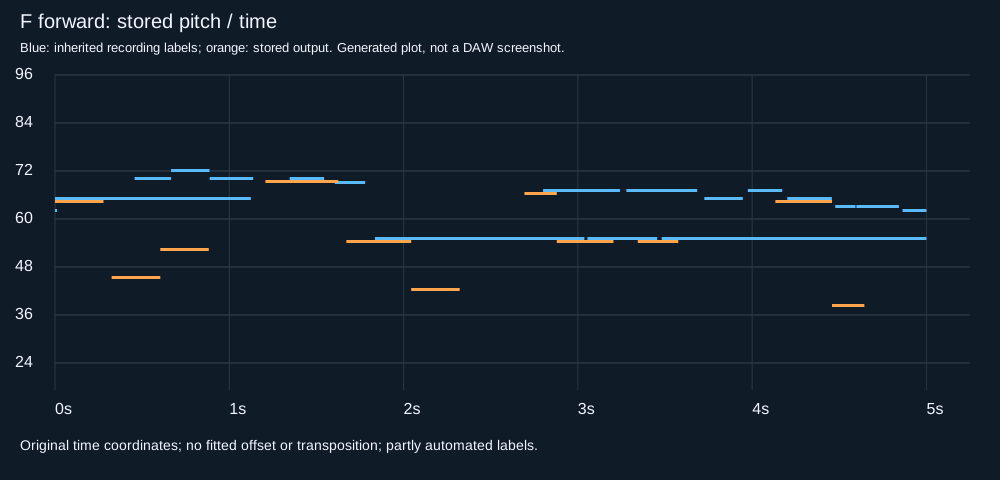
F and G both matched four reference attacks, although F exported eleven events with seven unmatched outputs while G exported five with one unmatched output. Data
E’s output pitch set included 33, 34, 38, 43, 46, 48 outside that excerpt’s inherited reference pitch set, so a playable note file still needed a pitch check. Data
E: real WAV · F: real WAV · G: real WAV · E: original MIDI · F: original MIDI · G: original MIDI · E: note/time ledger · F: Piano Roll · Inherited labels
4. MIDI to WAV: choose sound separately from notes
Our small downloadable renderer reads the same stored notes twice, using either a sine voice or a declared fundamental-plus-two-harmonics voice, with identical sample rate, gain, velocity mapping and envelope settings. Data
E’s two renders had equal frame counts but differed in 186,312 PCM samples, a control showing that one saved MIDI was rendered into two different waveforms. Data
Across E, F and G, the two voices returned identical re-detected pitch, onset and duration lists within each pair, but their saved MIDI bytes differed because the returned velocity values differed. Data
G’s first pitches 65 and 58 had input velocities 57 and 56, but became 87 and 94 after sine rendering and re-detection, reversing their stored accent order. Data
E’s later pitch-57 event and final pitch-48 event had input velocities 72 and 94, yet both returned 118 after the sine pass. Data
F’s first pitch-65 and pitch-53 events both entered the renderer at velocity 60, but returned velocities 103 and 95 in the sine pass. Data
E: sine WAV · E: harmonic WAV · G: sine WAV · G: harmonic WAV · Exact renderer · Independent WAV/formula check
5. A second WAV-to-MIDI pass is a separate check
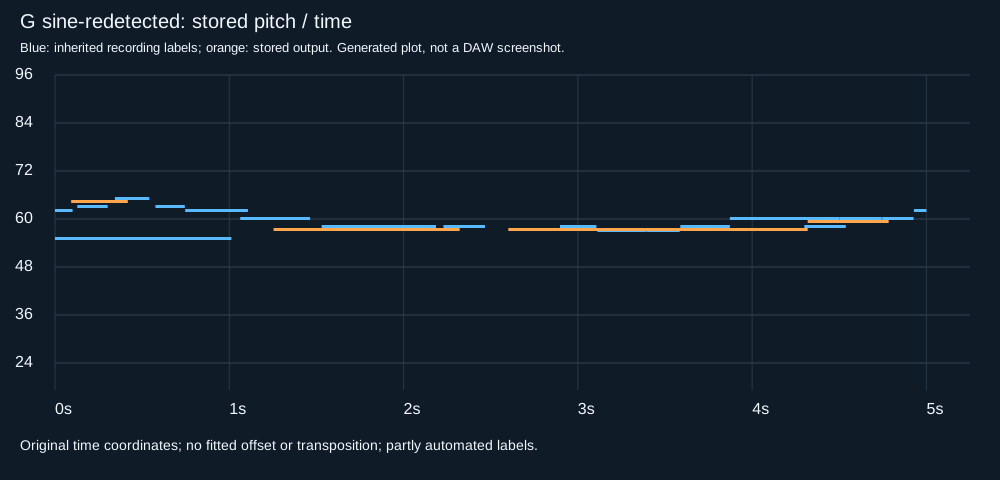
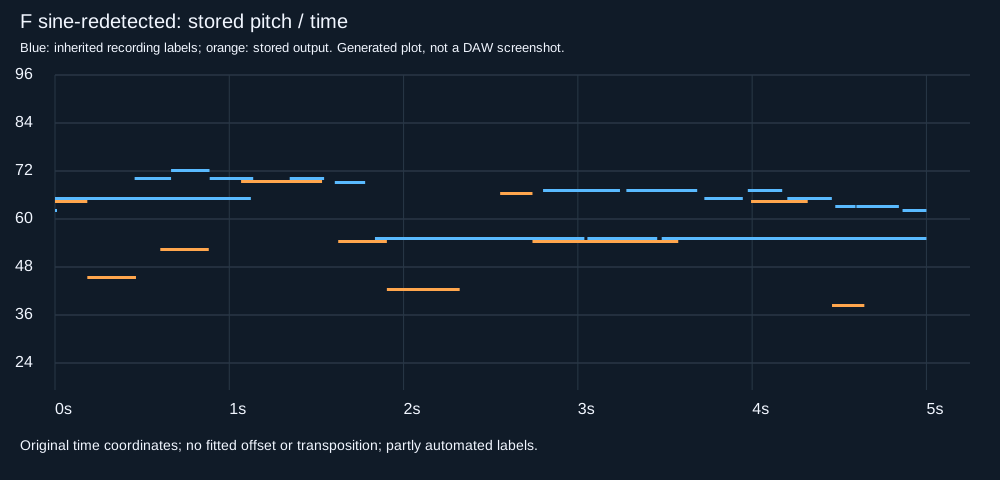
The three sine re-detections matched 23 of the 26 MIDI events that generated them, yet matched 0 of the 48 original recording-reference attacks under the same rule. Data
E’s initial pitch-57 event disappeared in both re-detections while its later pitch-57 event survived, so preserving a pitch class did not preserve both wanted attacks. Data
F’s two adjacent pitch-55 events around 2.879 and 3.344 seconds became one interval lasting 836.458 milliseconds in both re-detections, instead of the first input interval’s 325.000 milliseconds. Data
G’s first pitch-65 onset moved 139.583 milliseconds early while its final pitch-60 onset moved 46.875 milliseconds early, so one global time correction would not align both. Data
F’s pitch-53 event kept its exact stored onset and duration in both re-detections, despite its velocity changing from 60 to 95 in the sine pass. Data
E’s sole originally accepted pitch-58 attack shifted to 229.424 milliseconds early after rendering and re-detection, crossing the declared 150-millisecond boundary without changing its pitch. Data
E: sine re-detected MIDI · F: sine re-detected MIDI · G: harmonic re-detected MIDI · F: merged-note ledger · G: re-detected Piano Roll · All fields and denominators
6. Reproduce before accepting an edit
Keep the original WAV and original MIDI, inspect wanted attacks and their endings, choose a rendering sound, and assess re-detection against the generating MIDI separately from the recording reference. Data
A fresh directory reproduced all 44 numerical input, MIDI, WAV, note-table, plot and result files byte-for-byte, while the independent renderer checker also verified RIFF fields and 372 selected PCM samples. Data
python generate.py
node convert.mjs
python render.py
node convert.mjs . render-inputs.json
python analyze.py
python source-check.py
python verify-render.py
python verify-claims.py
Reproduction contract · Real-source crop generator · Unchanged detector runner · Independent MIDI parser · Event/WAV comparisons · Original-source check · Independent render check · Sentence arithmetic · Actual browser download check · Fresh-run hashes · Download SHA256 · Complete sentence ledger · Reviewed-source differences
7. Limits and attribution
These neighboring excerpts share one performance and partly automated, sometimes overlapping labels, while the limited oscillator ignores program changes, pedals and pitch bends, so this panel cannot establish general converter accuracy or predict a DAW or SoundFont render. Data
Qingyang Xi and colleagues supply GuitarSet 1.1.0 under CC BY 4.0; our cropping, transcription measurements, explicit synthetic rendering and plots are modifications without implied endorsement. Data
8. Choose the next conversion step
To convert a WAV file to MIDI, convert WAV into MIDI, or turn WAV into MIDI, use the same single-note workflow; use the decoding, source-clock, short-clip and MIDI-to-WAV format guides for those specific checks. Data
WAV decoding · Wrong sample-rate label · Very short clips · Rendered WAV handoff · MIDI file standard overview · Original GuitarSet source